
Other day I have been asked to find out if we can hide DL Members. So Users can see the DL in Address Book, but can’t see the members. I found it’s very easy to do. (Microsoft Exchange Rocks!!!)
Here is how you do it.
- Open Active Directory Users and Computers console.
- Click View Menu and select Advanced Features (to enable it)
- Find your Distribution List or Security Group (mail enabled) in the OU
- DO NOT search your group. Because if you open the DL/Group properties from search windows, it will NOT show the Attribute Editor which is the advanced feature)
- Double click to open the DL/Group to see the properties. Go to Attribute Editor tab.
- Find hideDLMembership attribute, double click to open and select True. Click OK twice to close the dialog boxes.
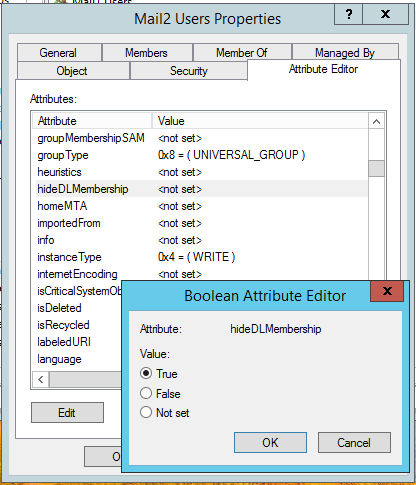
It takes a while to take effect the changes while Exchange generates Offline Address Book and Outlook get it. If you want to make the offline address book process faster, follow my blog post here.
In Outlook, DL properties shows like this with hidden members.
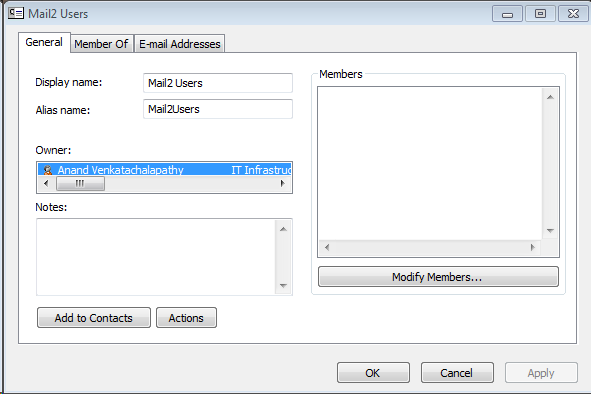
If we check the DL in OWA, it shows like this:

Hope it helped you. Leave me a reply.
 Anand, the Architect
My 2013 exchange in advanced view doesn’t show the hidedl???? in ADSI it shows enabled tho.
How owner can see member to add/remove?
Hello Gagab,
Owner of the distribution group can see the members and add/remove from OWA settings. In OWA, Find the owned distribution groups at Settings (Gear icon) >> General >> Distribution Groups.
We are using Exchange 2016 and have the setting in the distribution list properties, however, I found the distribution list still show the members.
You mean users can still see the members. Sad thing is Exchange server have to generate the Offline Address Book with the updated setting, that need to be downloaded by Outlook client. Usually this takes 24 hours. You many manually start the offline Address book generation.
Once the updated OAB is in the client machine, they no longer can see the members.
Yes…
I have follow your instruction to add the setting on Tuesday and I have deleted the local offline address book, however, it still can see the members after the offline address book re-dowloaded.
Is this related to us using on-premise Exchange with Exchange Online in hybrid mode?
Hello Leo,
I see you deleting the Offline Address Book files on our local computer. Outlook would’ve downloaded offline address book that is not updated yet.
You can manually update the Offline Address Book at Exchange server by running this command. Replace the “OAB Name” with the name you have in your Exchange org.
Update-OfflineAddressBook -Identity “OAB Name”
If you don’t know your Offline Address Book name, run this command to identify:
Get-OfflineAddressBook
Hello Anand,
One more thing, can we limit who can search and see the distribution group??
Yes. By creating new address list with the filter to exclude the DL and assigning to the user mailboxes.
Hello, Anand,
Could you let me know how to do this??